


How to Bind the Authenticator
Step 1: Download the Authenticator
Gate supports both [Google Authenticator] and the [Gate Authenticator].
- Gate Authenticator: You can find download options on the web via the[download page].
- Google Authenticator: you can directly search for Gate Authenticator/Google Authenticator in the App Store or Google Play to download.
You can click [How to Download Google/Gate Authenticator] to view the detailed download steps.
Step 2: Bind Your Authenticator
App:
-
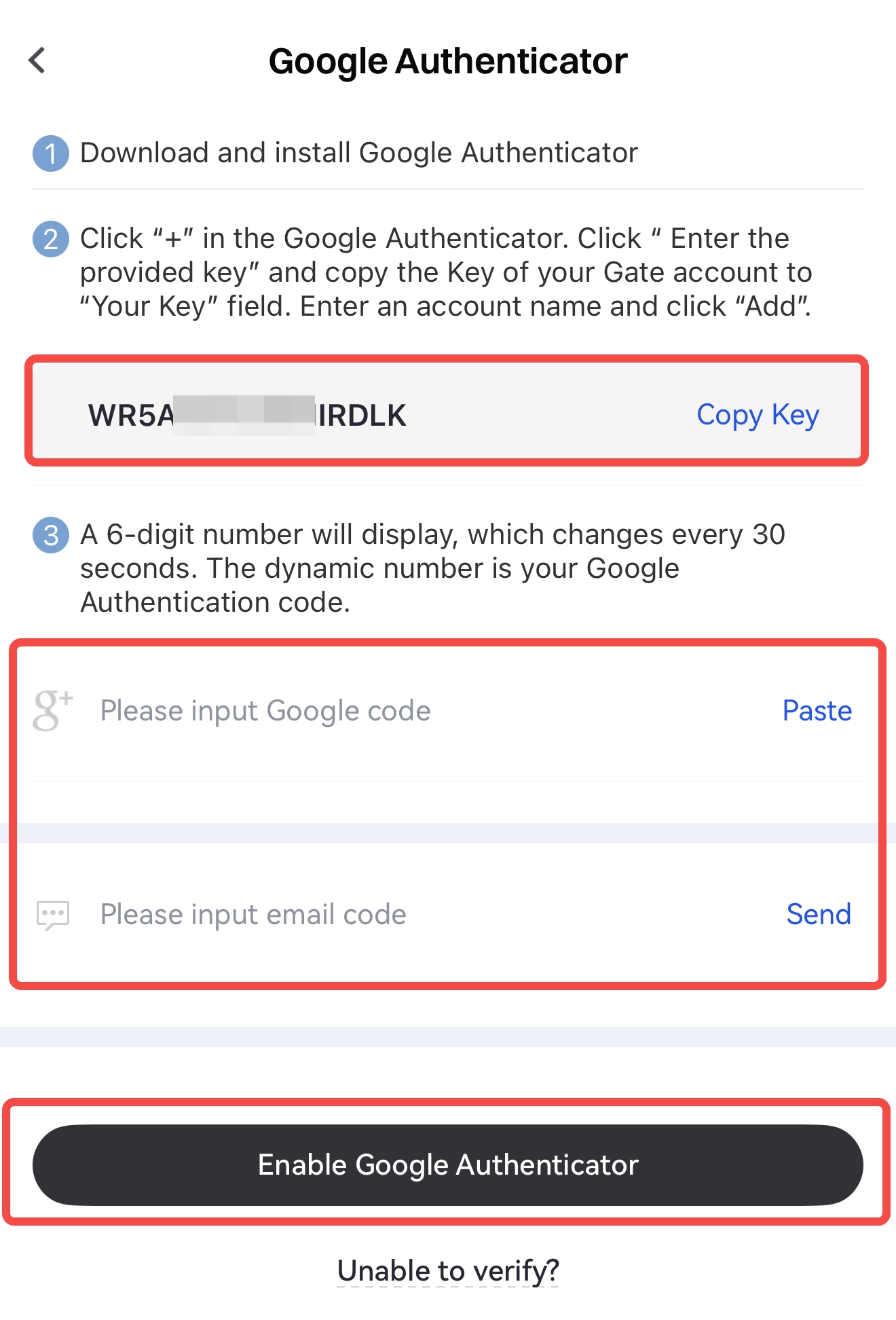
On the homepage, tap the [profile icon] in the top-left corner, then tap the arrow icon next to your avatar to enter [Security Center] - [Google Authentication], and copy the secret key.
-
Open the Google Authenticator app, tap the + icon, paste the secret key into the Key input field, enter your Gate account name, and tap [Done].
-
Return to the Gate app. On the Google Authentication page, as shown below, enter the Google/Gate verification code and other required information, then tap [Enable Google Authentication] to complete the binding.
Web:
-
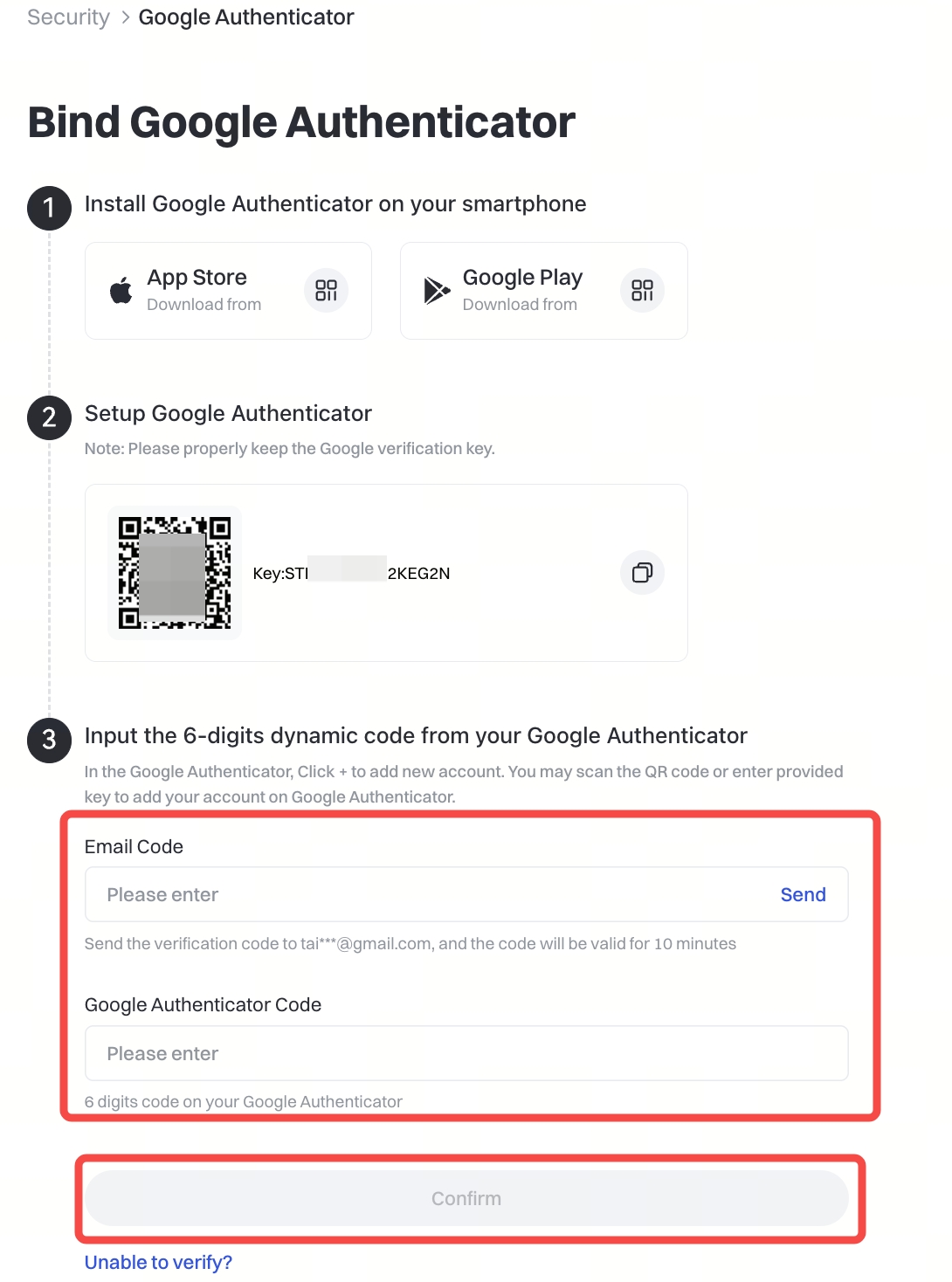
Go to the Google Authentication setup page: click [Profile] - [Security Center] - [Google Authenticator] - [Enable], then copy the secret key.
-
Open the Google Authenticator app, tap the + icon, paste the secret key into the Key input field, enter your Gate account name, and tap [Done].
-
Return to the Google Authentication setup page. As shown below, enter the Google/Gate verification code and other required information, then click [Confirm] to complete the binding.
How to Unbind Authenticator
There are two unbinding scenarios:
1. If you can still receive Google/Gate verification codes:
You can log in to the web or app version and unbind it yourself via [Security].
2. If you cannot enter verification codes (e.g., due to phone loss or app deletion):
You can apply for unbinding using either of the following methods:
2.1 Open the Security Reset Form, fill in the requested information, and submit your request.
You will receive a reply within 1–3 business days.
2.2 Submit a support ticket or send an email to [email protected] explaining your situation and providing the following details:
- Gate account username and User ID (UID)
- Registered email address
- Full name and registered city
- Traded currencies
- Linked phone number
- A selfie holding your ID card and a handwritten note containing your Gate account name, the current date, and a short statement describing your request
Notes:
- The authenticator is used for login, withdrawals, password changes, and other security operations.
If you frequently fail to receive SMS codes, it is recommended to enable the authenticator. - If the Google/Gate verification code is repeatedly shown as incorrect, please check and synchronize your phone’s time settings.
The content provided herein is for reference and educational purposes only and does not constitute any financial, investment, trading, or legal advice, nor does it constitute an offer or solicitation to buy or sell any digital assets. Gate makes no express or implied representations or warranties regarding the accuracy, completeness, or timeliness of the information contained herein. Product features, interfaces, rules, and fee structures may be updated or adjusted at any time. Please refer to the latest announcements and the actual information displayed on the Gate platform for the most accurate details.
Digital asset investments involve significant risk, and prices may fluctuate substantially. You may lose the entire amount of your investment. Please make decisions cautiously based on your own financial situation and risk tolerance after fully understanding the associated risks. If necessary, you are advised to consult an independent professional financial or legal advisor.
For more information about potential risks, please refer to Gate's Risk Disclosure and User Agreement.
