


A funcionalidade de alerta de liquidação da Gate ajuda os utilizadores a receberem notificações quando a sua relação da margem de manutenção (MMR) se aproxima de um limiar predefinido. Isto permite aos utilizadores gerir o risco e evitar a liquidação.
Versão do site
1. Aceda às definições de negociação:
- Inicie sessão na sua conta Gate.
- Aceda à página de futuros e clique em "Definições de negociação" no canto superior direito.
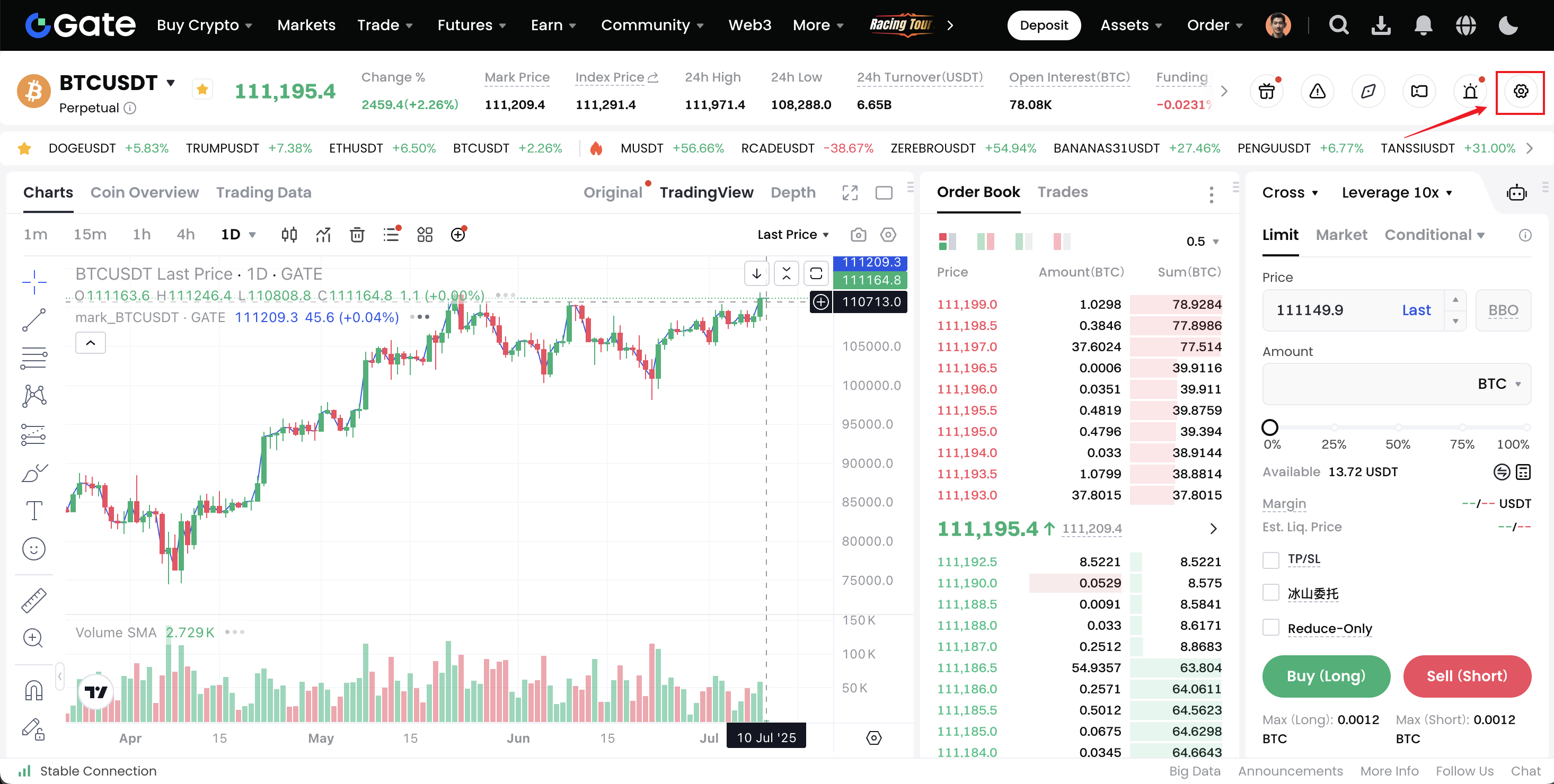
2. Ative o alerta de liquidação:
- Na página Definições de negociação, encontre "Definições de notificação" — "Alerta de liquidação".
- Por predefinição, a funcionalidade de alerta de liquidação está ativada. Clique em "Editar>" para introduzir as definições de personalização.
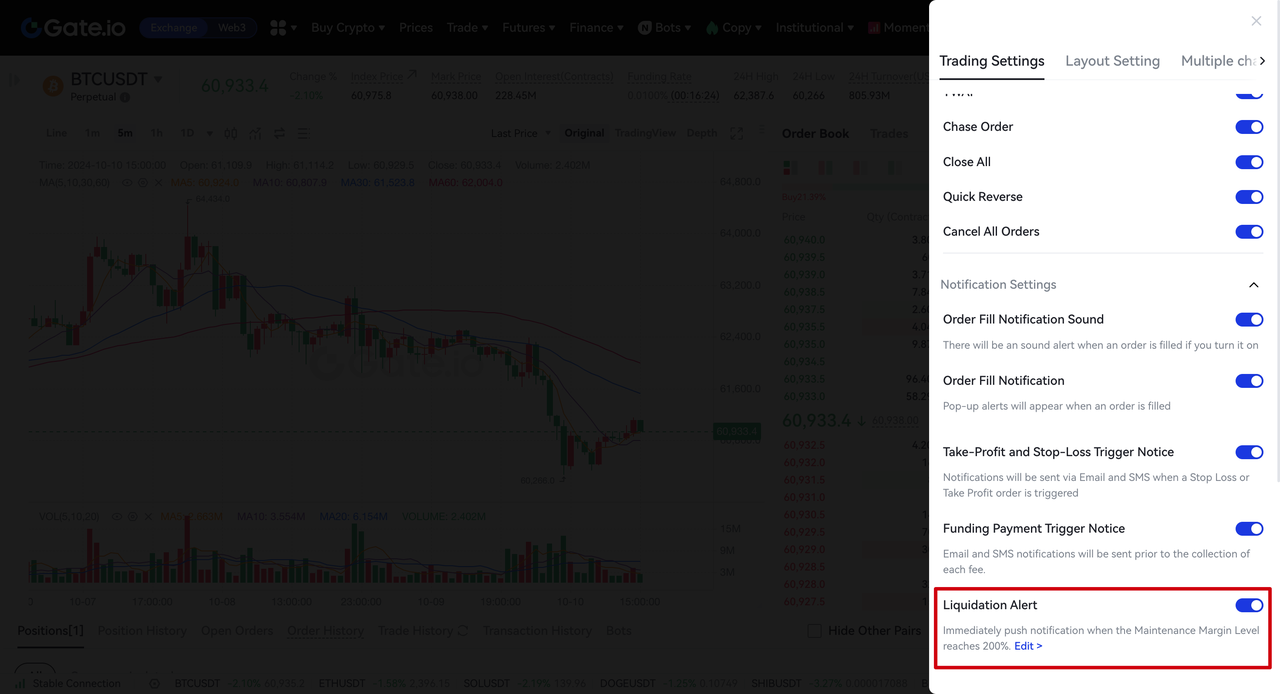
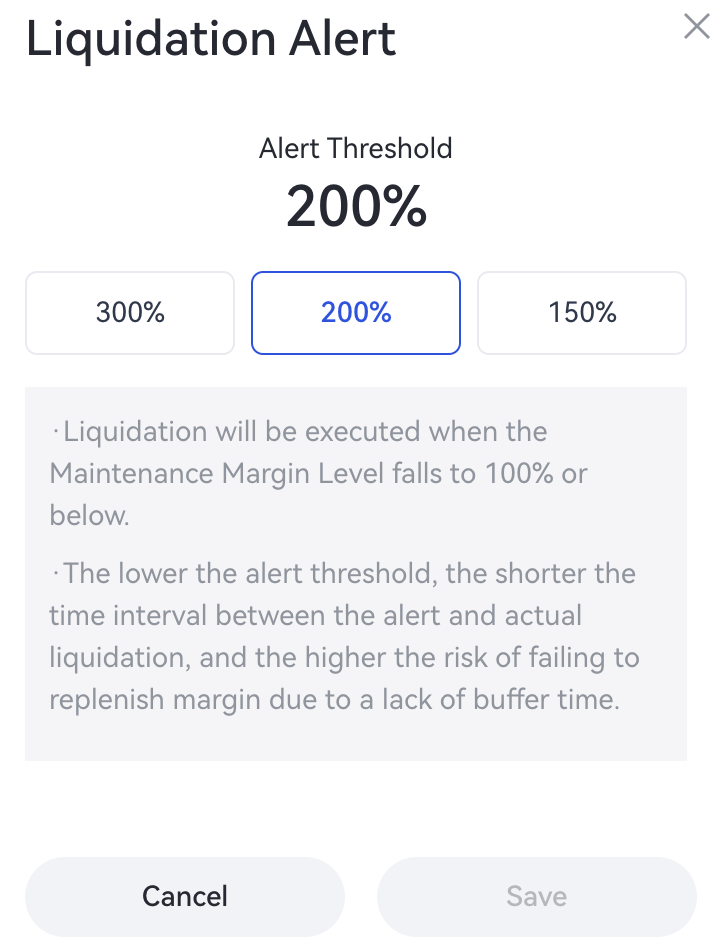
3. Personalize o limiar de alerta de liquidação:
- Na janela pop-up de personalização do alerta de liquidação, pode selecionar 300%, 200% ou 150% como o limiar de alerta de MMR. A predefinição é 200%.
- Se não for selecionado um novo limiar, o botão Guardar não estará disponível. Após o ajuste, clique em "Guardar" para confirmar.
4. Envie notificações:
-
Normalmente, o sistema enviará uma notificação. No entanto, em condições de mercado extremas, a entrega poderá sofrer atrasos. Recomendamos monitorizar a sua conta e as posições abertas diretamente na plataforma para gerir o risco em tempo útil.
-
As notificações são enviadas a cada 30 minutos. Se um alerta relacionado já tiver sido enviado nos últimos 30 minutos, o sistema verificará e enviará a próxima notificação após mais 30 minutos.
5. Desative as notificações de alerta:
Se a funcionalidade de alerta de liquidação estiver desativada, não serão enviadas quaisquer notificações relacionadas. Quando a funcionalidade for reativada, irá repor automaticamente as predefinições de limiar.
Versão da aplicação
1. Aceda às Definições de futuros:
- Abra a aplicação Gate e inicie sessão na sua conta.
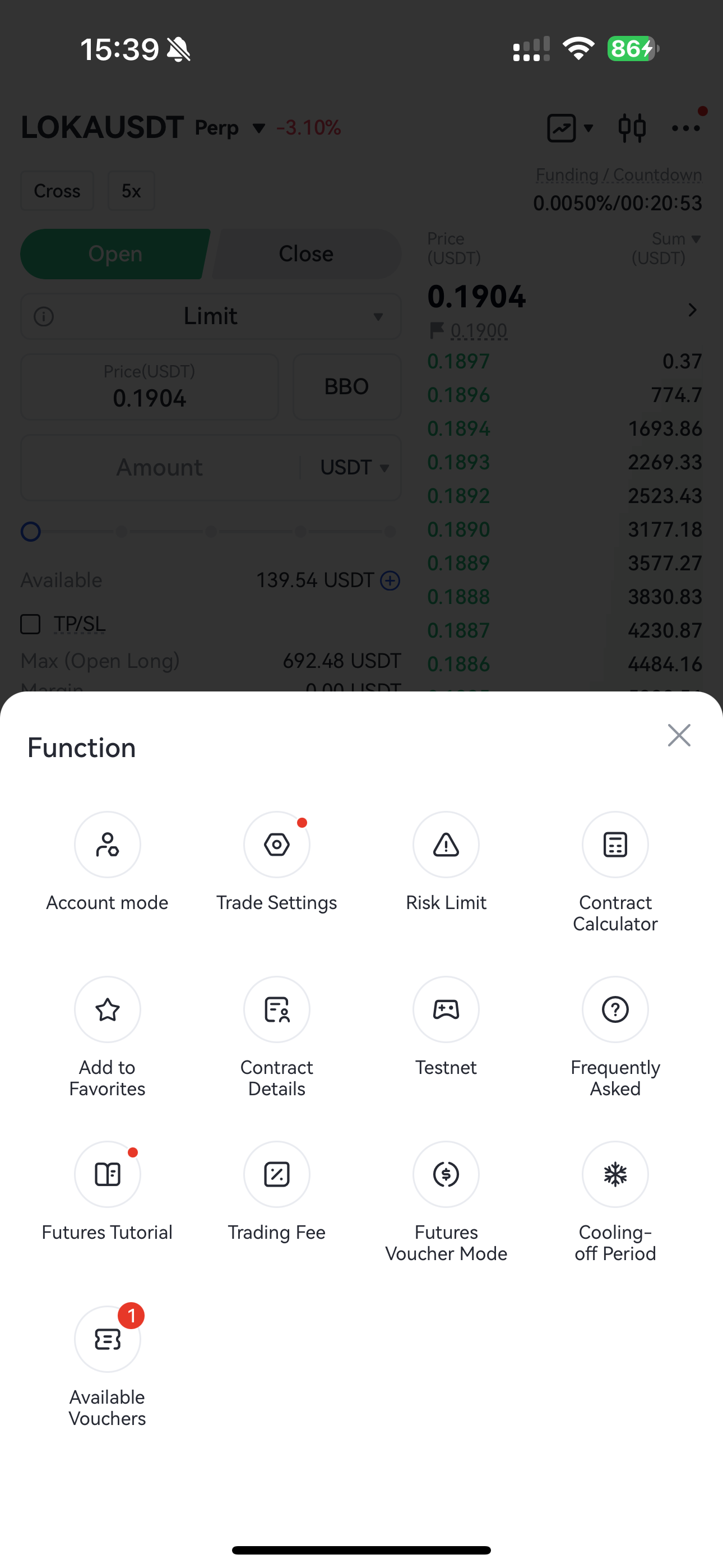
- Toque no botão de definições com três pontos no canto superior direito da página de negociação de futuros.
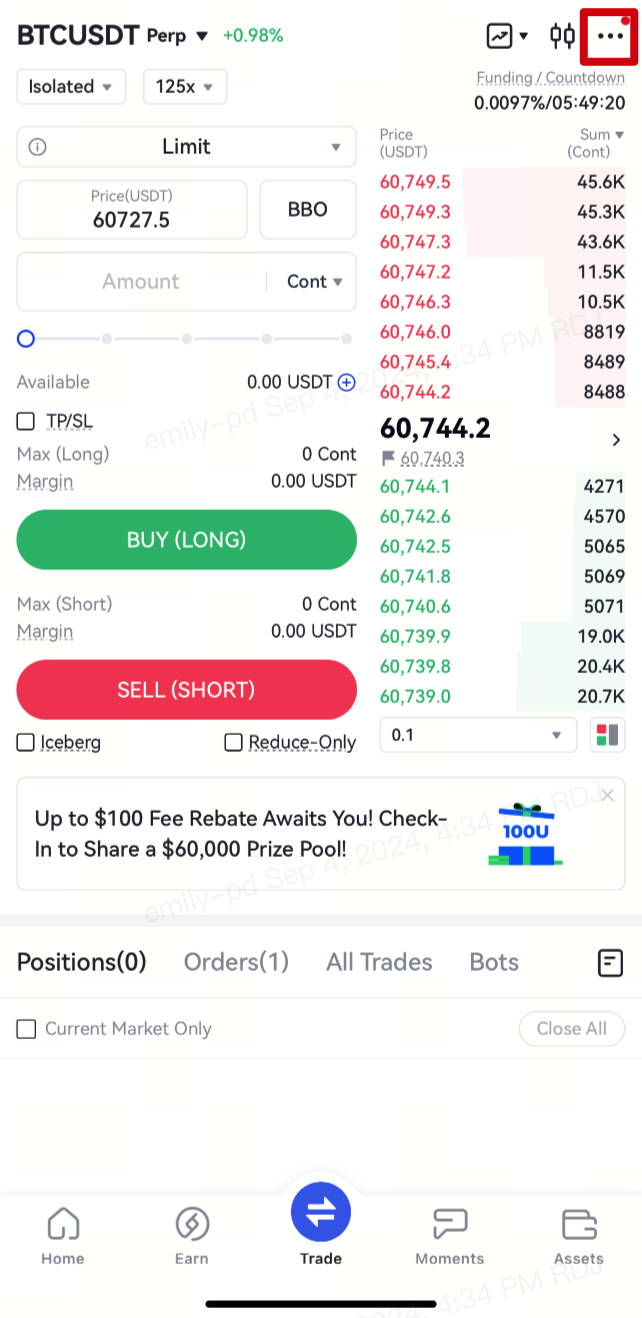
- Selecione "Definições de negociação".
2. Ative o alerta de liquidação:
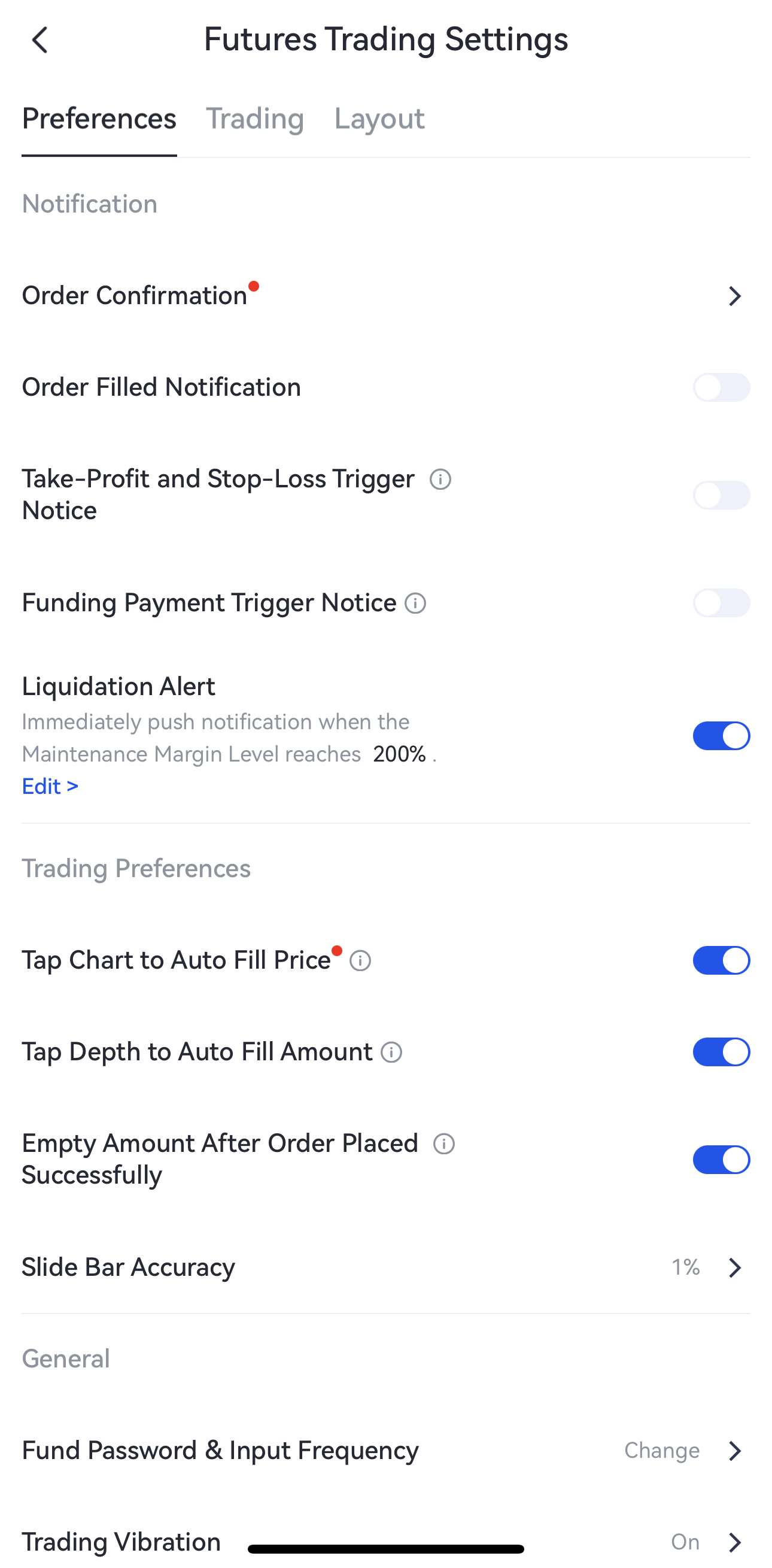
- Na página Definições de negociação de futuros, encontre "Notificação" — "Alerta de liquidação". (Observação: Esta funcionalidade está ativada por predefinição).
- Toque em "Editar>" para aceder à página de personalização.
3. Personalize o limiar de alerta de liquidação:
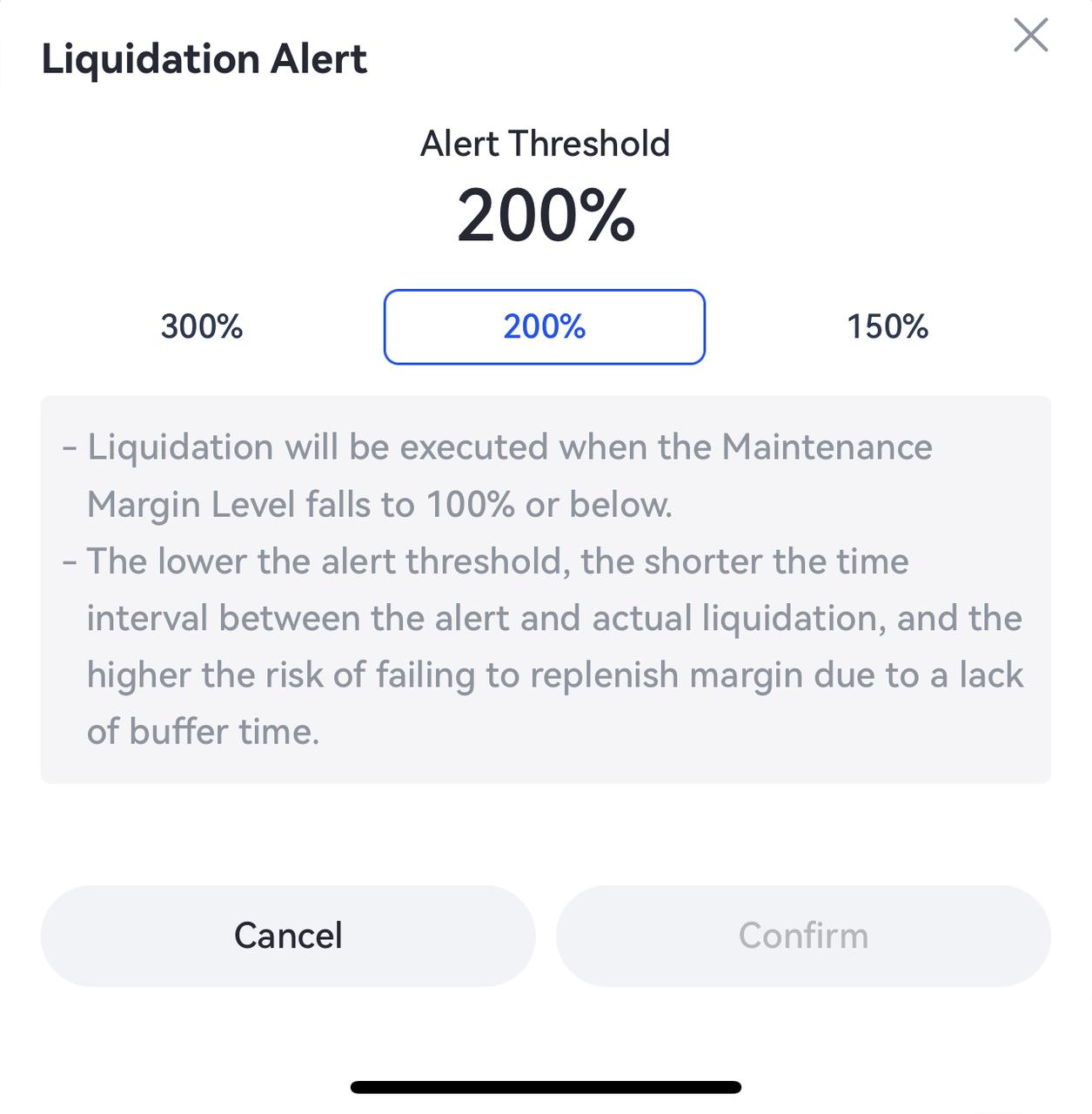
- Na janela pop-up de personalização do alerta de liquidação, pode selecionar 300%, 200% ou 150% como o limiar de alerta de MMR. A predefinição é 200%.
4. Envie notificações:
-
Normalmente, o sistema enviará uma notificação. No entanto, em condições de mercado extremas, a entrega poderá sofrer atrasos. Recomendamos monitorizar a sua conta e as posições abertas diretamente na plataforma para gerir o risco em tempo útil.
-
As notificações são enviadas a cada 30 minutos. Se um alerta relacionado já tiver sido enviado nos últimos 30 minutos, o sistema verificará e enviará a próxima notificação após mais 30 minutos.
5. Desative as notificações de alerta:
Se a funcionalidade de alerta de liquidação estiver desativada, não serão enviadas quaisquer notificações relacionadas. Quando a funcionalidade for reativada, irá repor automaticamente as predefinições de limiar.
A Gate reserva-se o direito final de interpretar o produto.
Para obter mais assistência, visite a página de apoio oficial do Gate ou contacte a nossa equipa de apoio ao cliente.
O conteúdo aqui disponibilizado destina-se apenas a fins de referência e educativos, não constituindo qualquer aconselhamento financeiro, de investimento, de negociação ou jurídico, nem representa uma oferta ou solicitação para comprar ou vender quaisquer ativos digitais. A Gate não assume quaisquer declarações ou garantias, expressas ou implícitas, quanto à exatidão, integridade ou atualidade das informações aqui contidas. As funcionalidades dos produtos, interfaces, regras e estruturas de comissões podem ser atualizadas ou ajustadas a qualquer momento. Consulte os anúncios mais recentes e a informação efetivamente apresentada na plataforma Gate para obter os dados mais precisos.
Os investimentos em ativos digitais envolvem riscos significativos, podendo os preços variar substancialmente. Existe a possibilidade de perder a totalidade do montante investido. Tome decisões de forma cautelosa, tendo em conta a sua situação financeira e tolerância ao risco, após compreender plenamente os riscos associados. Se necessário, recomenda-se consultar um consultor financeiro ou jurídico independente.
Para mais informações sobre potenciais riscos, consulte a Divulgação de Riscos e o Acordo de Utilizador da Gate.
