


Applicable Instructions
This article applies to: Gate desktop (Mac / Windows systems)
Preparation before operation: Make sure your computer is connected to the internet and has sufficient storage space
Estimated time required: 3 minutes
Operation Objective
This guide will walk you through how to download and install the Gate client on your computer.
Steps
Step 1: Go to the Download Page
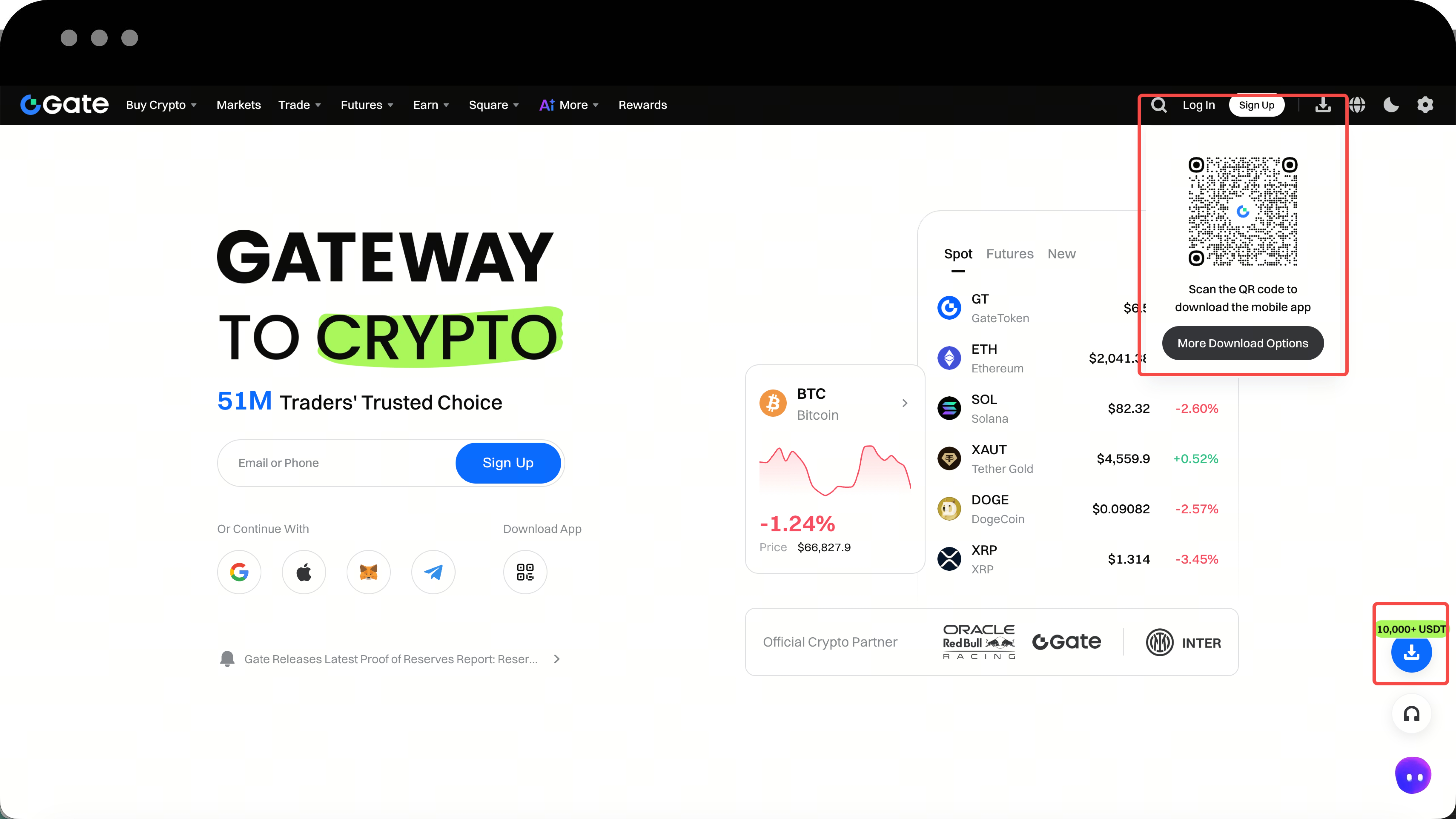
- Visit the gate.io official website and click the Download button at the top of the page.
- Alternatively, click the Download icon on the homepage, then select More download options to access the download page.
Step 2: Select Your System Version and Download
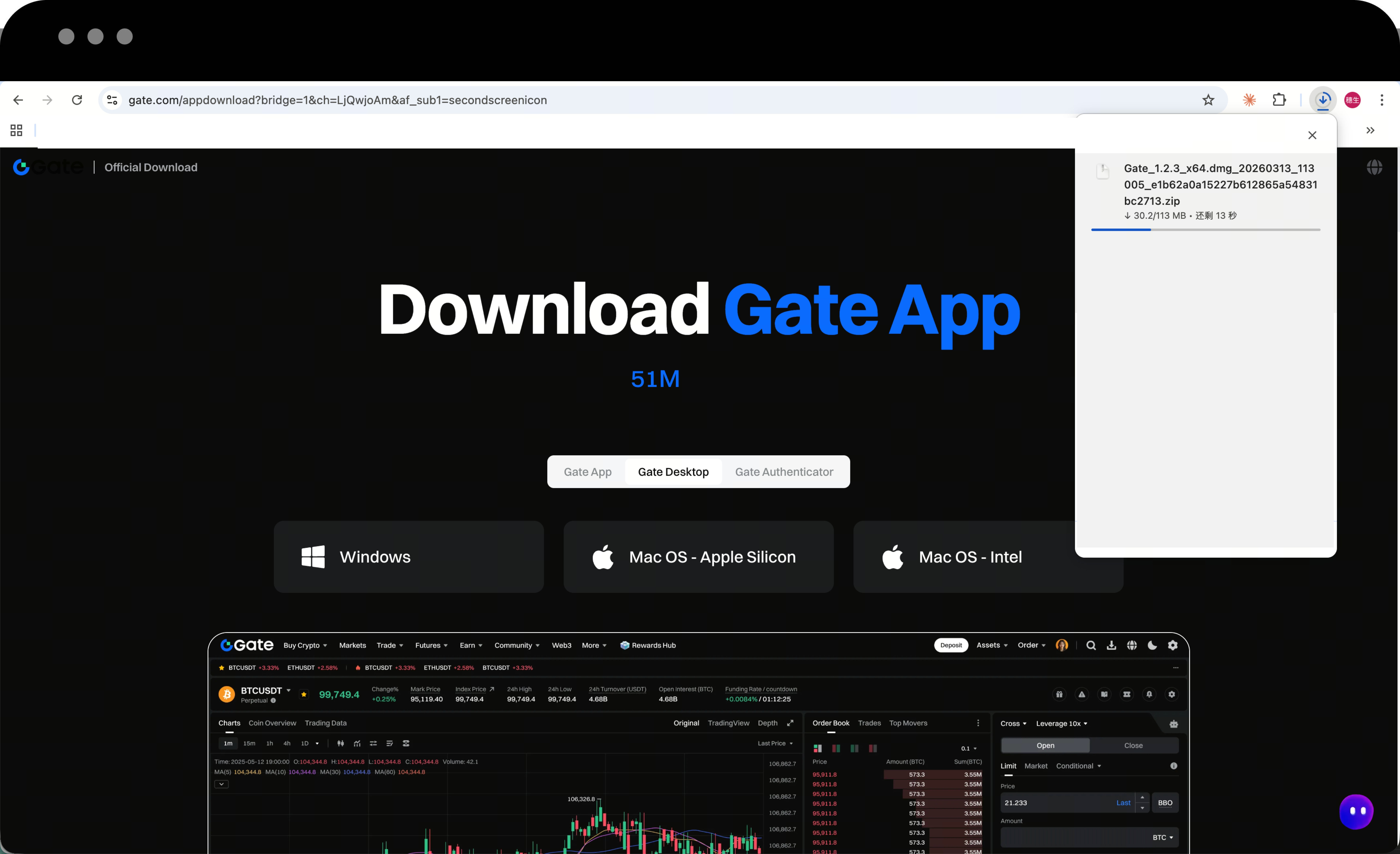
On the download page, choose the appropriate version for your computer system:
- Mac users: Click Mac Version to download
- Windows users: Click Windows Version to download

Step 3: Locate the Downloaded File
Once the download is complete, click the Show downloads or Download icon at the top right corner of your browser to find the installation file you just downloaded.
Step 4: Install the Client
Mac System:
- Double-click the downloaded installation file to open it
- Drag the Gate icon into the Finder (Applications) folder
- Locate the Gate app in Finder and double-click to open it
Windows System:
- Find the installation package (.exe file) in your Downloads folder
- Double-click to run the installer
- Follow the installation wizard prompts to complete the installation
Notes
- When opening the app for the first time on Mac, you may see a "Cannot verify developer" prompt. Go to System Preferences > Security & Privacy to allow the app to open.
- If Windows displays a security prompt, select Run anyway to proceed with the installation.
- Always download the client from the official gate.io website. Avoid using third-party download links.
Frequently Asked Questions
Q1: What should I do if the download is slow or fails?
A: Please check if your network connection is stable, or try switching to a different network environment and download again. If the issue persists, contact customer support for assistance.
Q2: What should I do if Mac shows "Cannot open the app"?
A: Go to System Preferences > Security & Privacy > General, then click the Open Anyway button to use the app normally.
Q3: Can't find the app icon after installation?
A: Mac users can find it in Finder > Applications; Windows users can find a shortcut in the Start menu or on the desktop.
Disclaimer
The content provided herein is for reference and educational purposes only and does not constitute any financial, investment, trading, or legal advice, nor does it constitute an offer or solicitation to buy or sell any digital assets. Gate makes no express or implied representations or warranties regarding the accuracy, completeness, or timeliness of the information contained herein. Product features, interfaces, rules, and fee structures may be updated or adjusted at any time. Please refer to the latest announcements and the actual information displayed on the Gate platform for the most accurate details.
Digital asset investments involve significant risk, and prices may fluctuate substantially. You may lose the entire amount of your investment. Please make decisions cautiously based on your own financial situation and risk tolerance after fully understanding the associated risks. If necessary, you are advised to consult an independent professional financial or legal advisor.
For more information about potential risks, please refer to Gate's Risk Disclosure and User Agreement.
