


What Is a Gate Position Voucher?
Position vouchers are a new type of voucher introduced by Gate, offering users a zero-cost opportunity to experience futures trading. You can use the platform-provided margin to open a position with zero upfront cost. This allows you to get familiar with futures trading mechanics and potentially earn real profits, without risking your own funds. The platform will cover any losses incurred.
How to Use a Position Voucher (Web)
View Your Position Vouchers
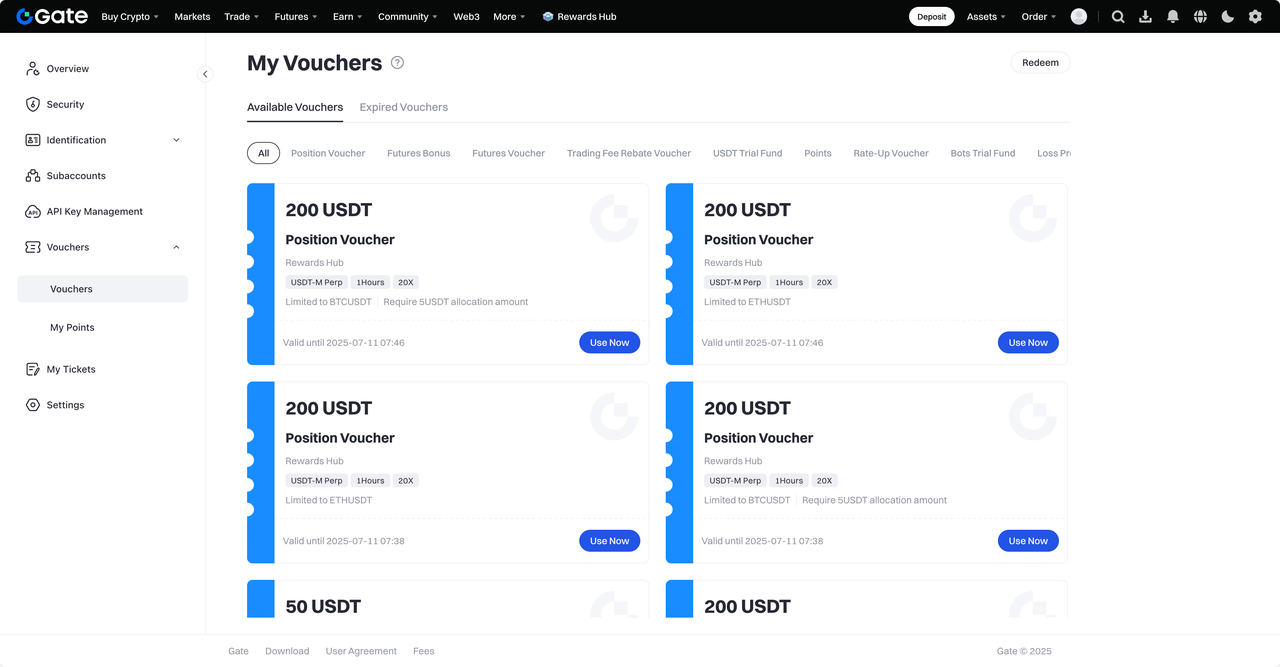
Step 1: Go to [Vouchers] – [Position Voucher] to view your available vouchers. Click [Use] to go to the futures trading page, and a usage pop-up will appear.
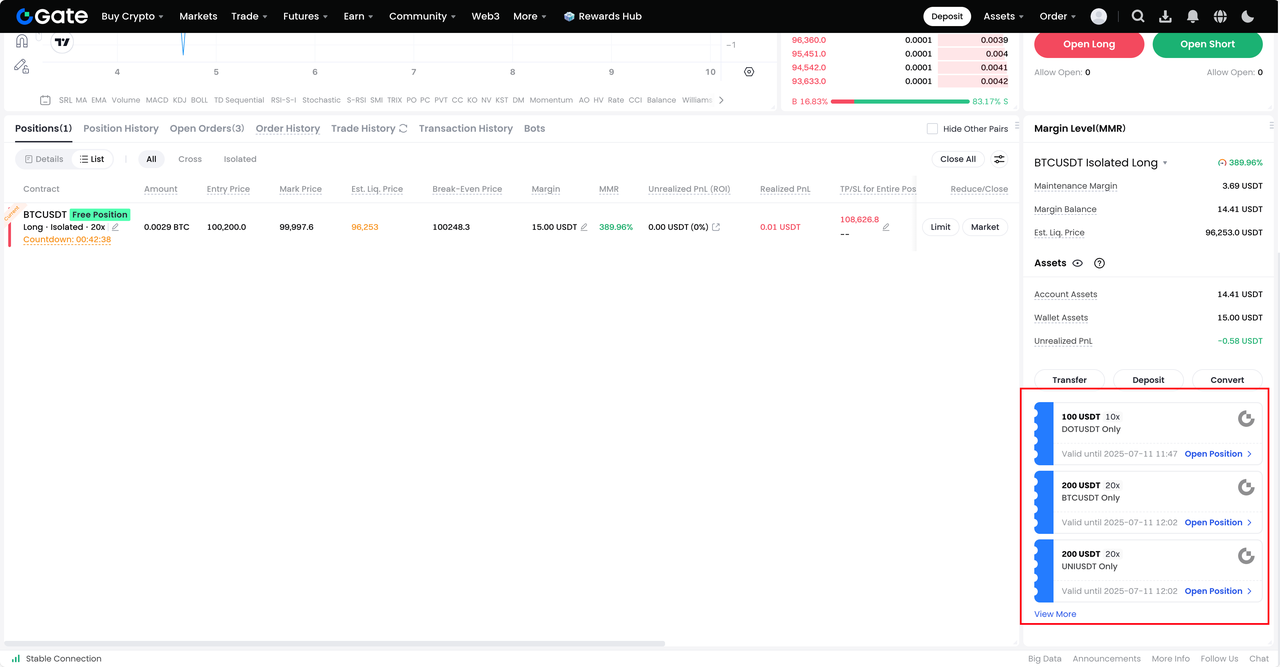
Step 2: A quick entry is also provided under the [Assets] section in the bottom-right corner of the futures trading page. Click [View More] to go to the Vouchers page.
Use a Position Voucher
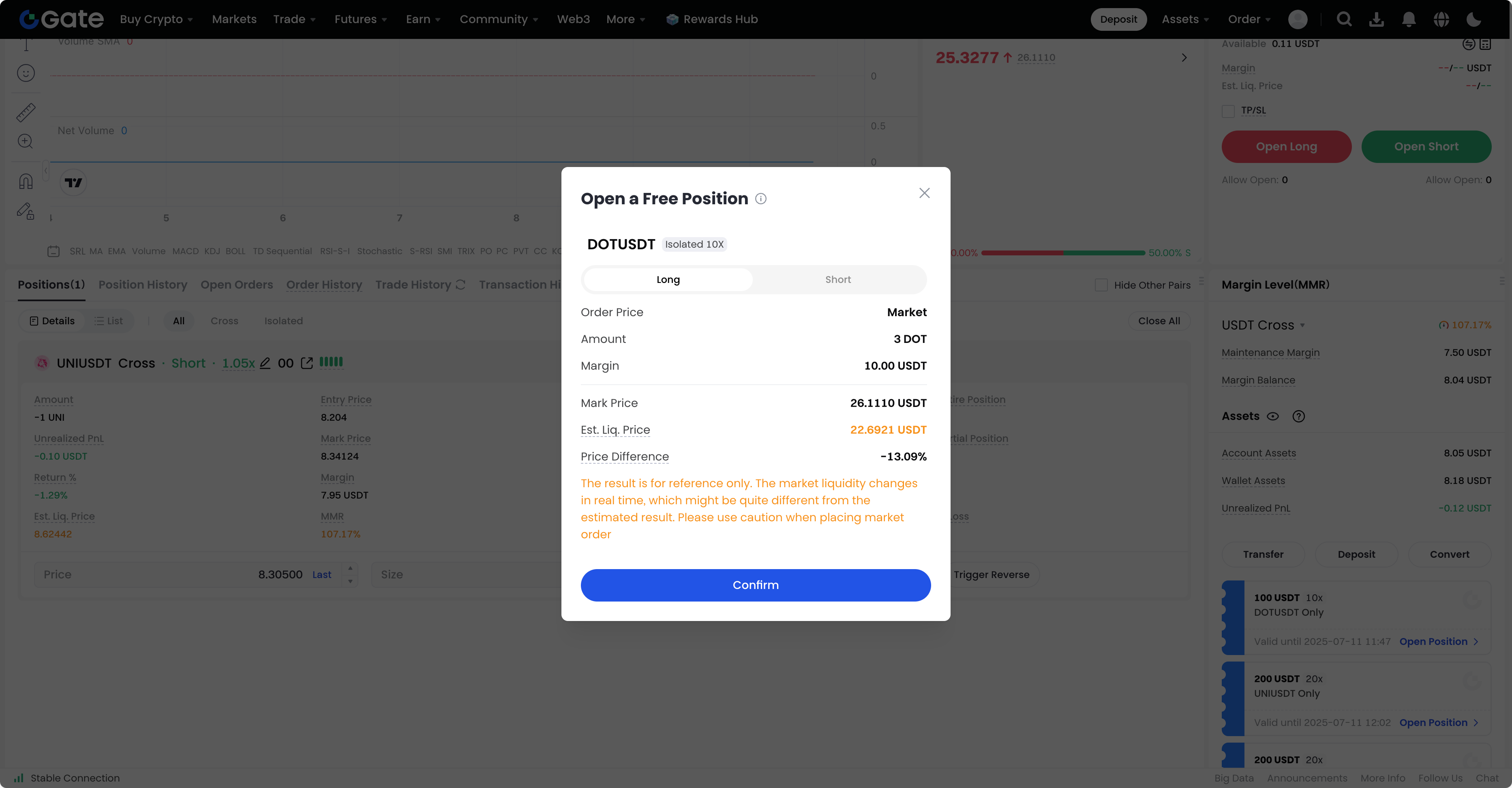
Step 1: In the pop-up window, select your position side: Long or Short.
Step 2: Before you can proceed, the following prerequisites must be met (displayed directly in the pop-up):
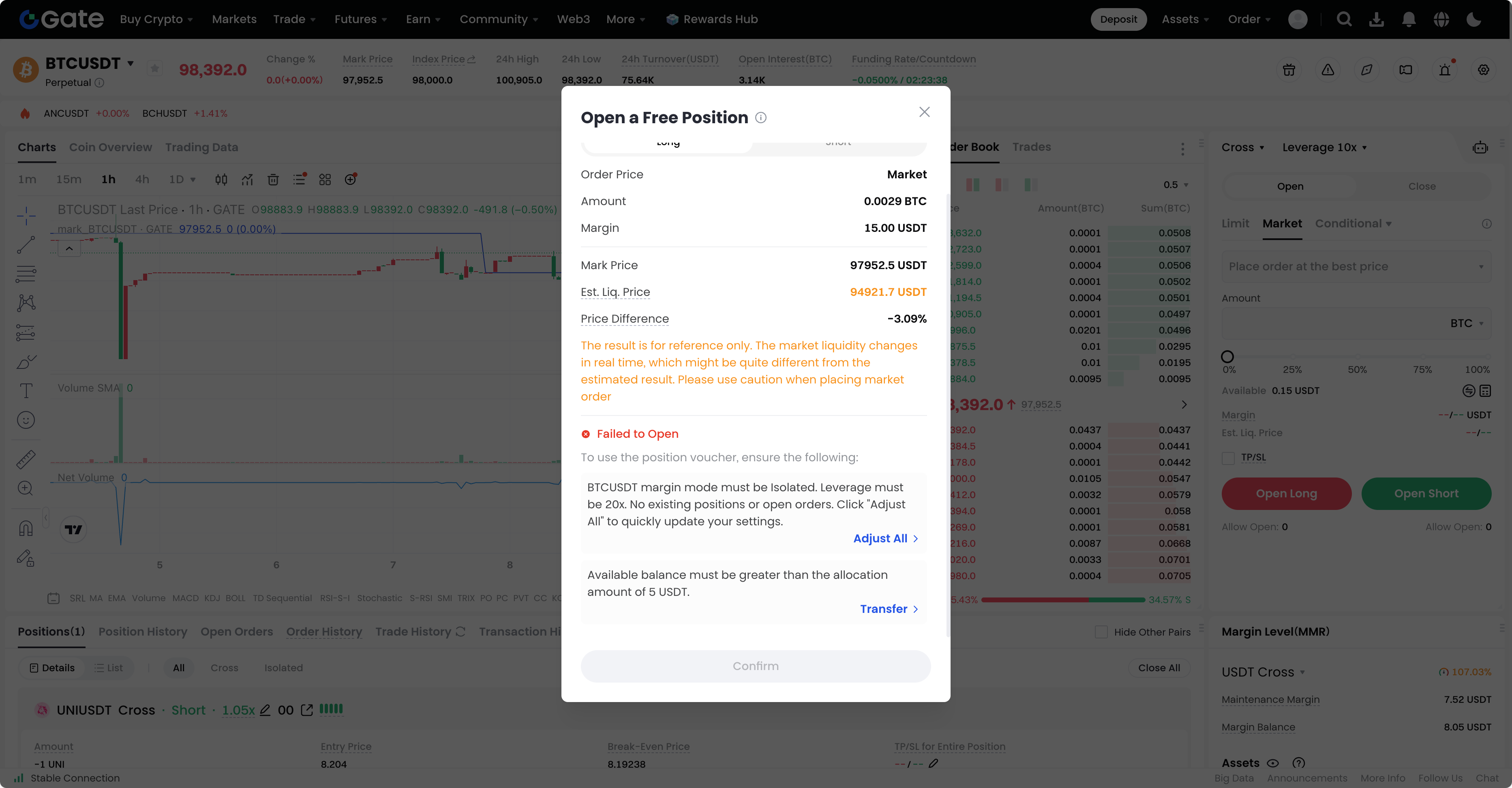
- For USDT-M contracts, your account margin mode must be isolated, and the leverage must match the one specified by the voucher. There must be no open positions or orders in the same market.
- For allocated vouchers, your available balance must exceed the required allocation amount set by the voucher.
Step 3: Since futures trading has various restrictions, we provide a one-click setup to help you meet the requirements. Click [Adjust All] to view your current status and apply automatic adjustments, including closing positions at the market price and canceling open orders, and adjusting leverage and margin mode to the voucher's required settings.
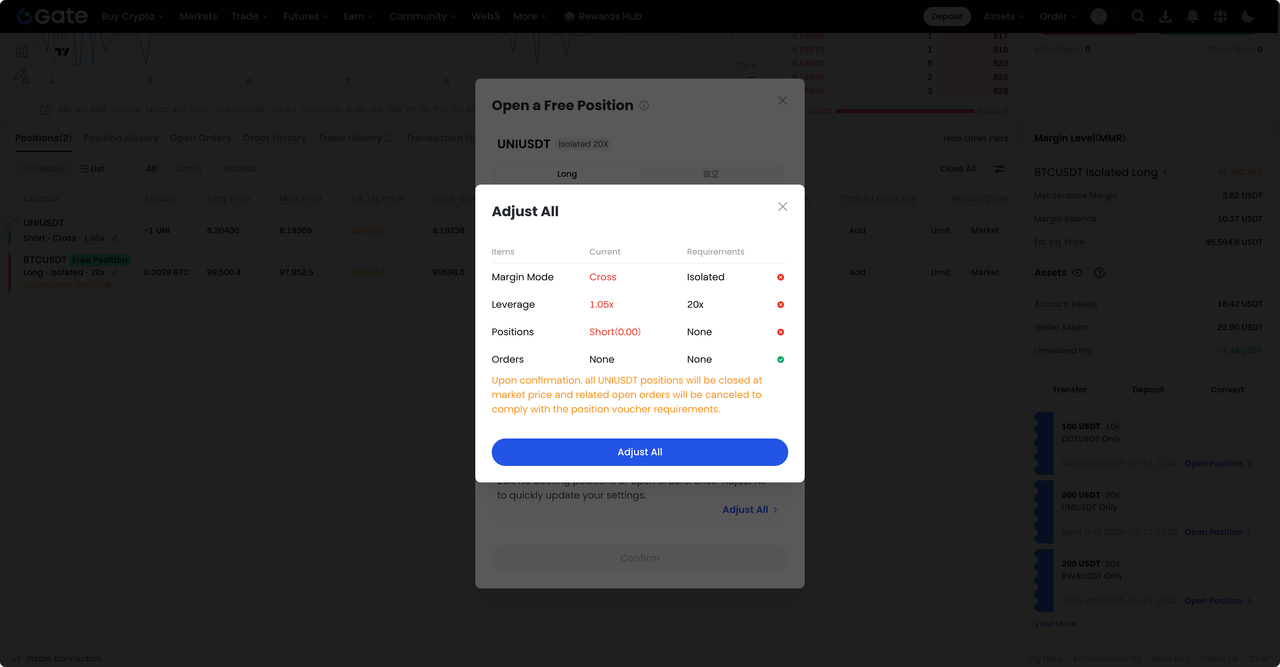
Note: In [Items] - [Positions], the unrealized PnL calculated using the last price is for reference only. Closing positions at the market price may involve slippage.
Step 4: Once all requirements are met, the confirmation button becomes active. Select your side and proceed to open the position.
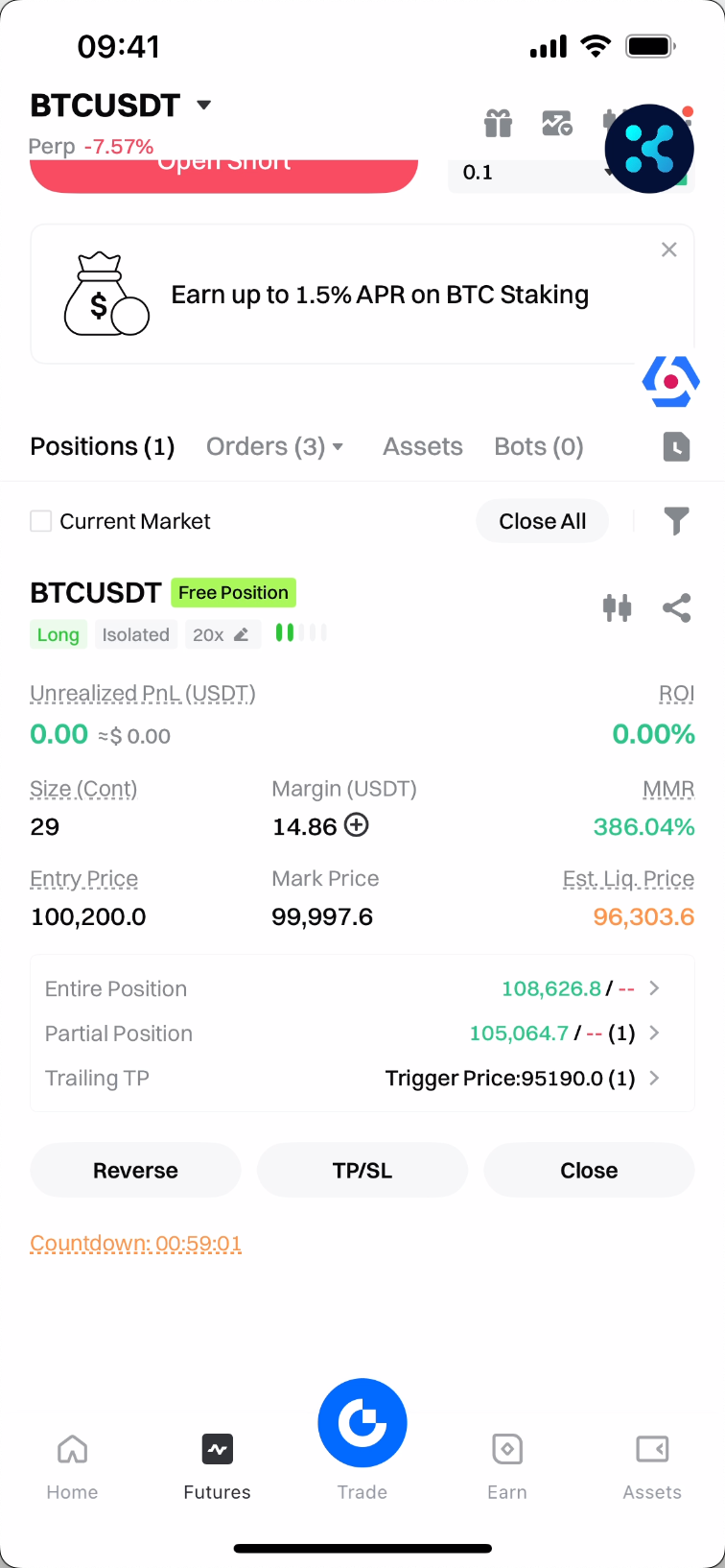
Step 5: After successfully using the position voucher, a free position will be created. You can identify it with the "Free Position" tag and the countdown in the position.
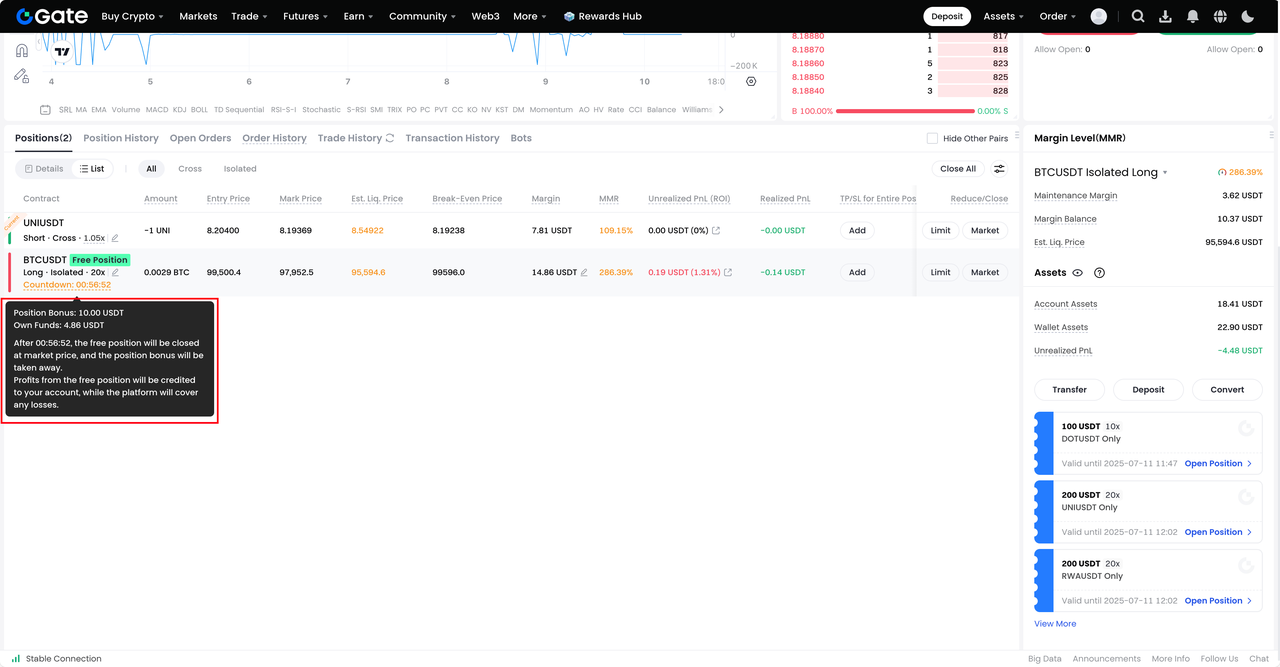
Step 6: Free positions support the same operations as regular positions. You can reduce, close, or reverse the position, and set take-profit/stop-loss (TP/SL) conditions for the position.
How to Use a Position Voucher (App)
View Your Position Vouchers
Step 1: Go to [Vouchers] – [Position Voucher] to view your available vouchers. Tap "Use," and a usage pop-up will appear.
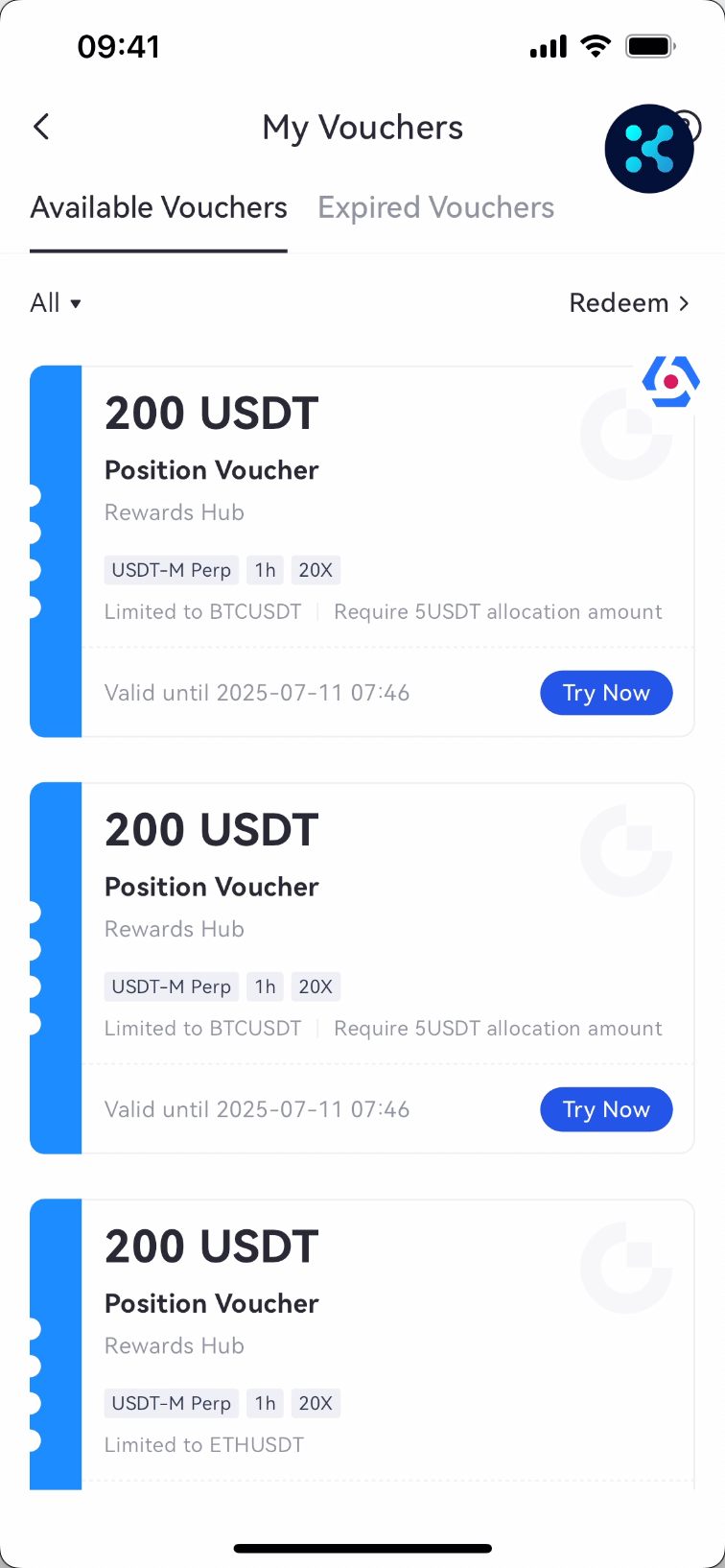
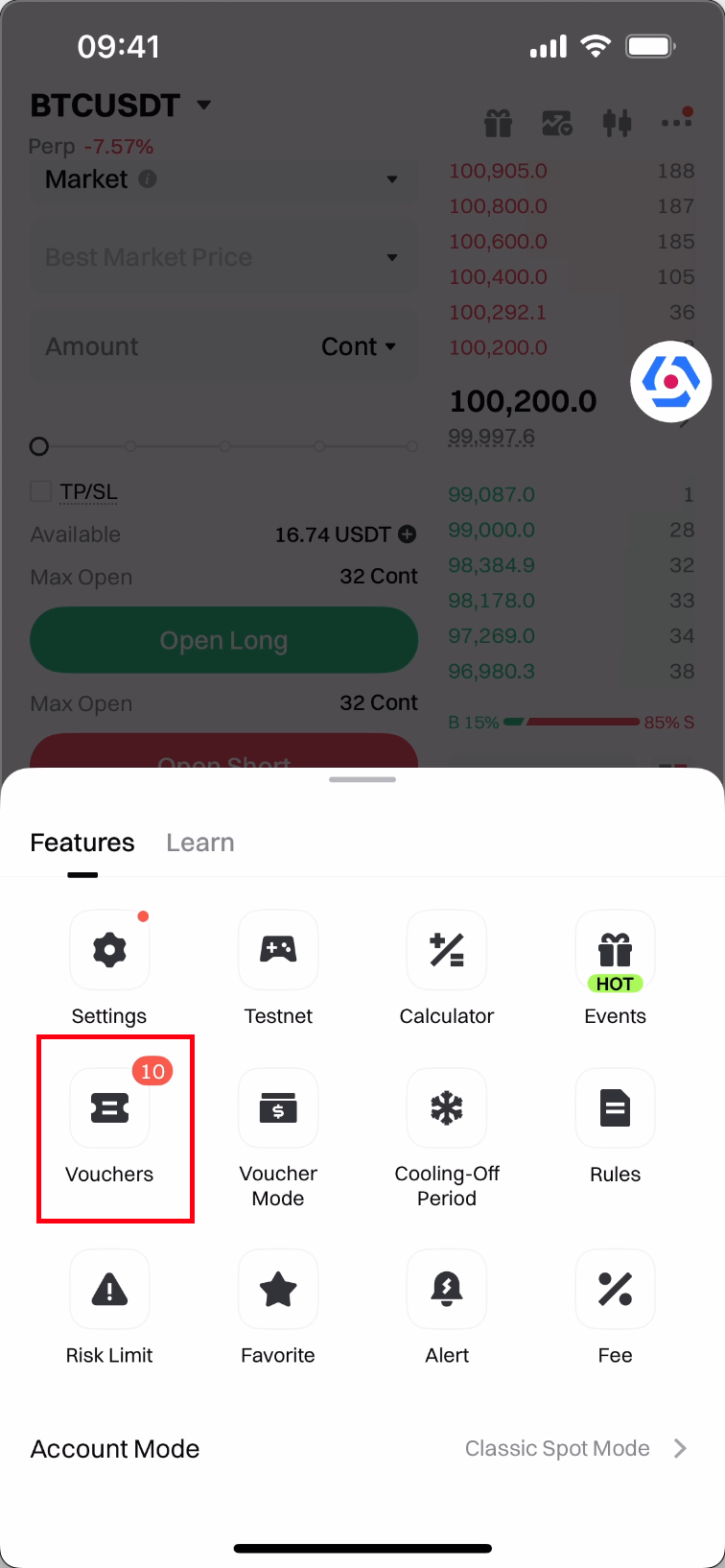
Step 2: You can also check available vouchers in [More] – [Vouchers] on the futures trading page.
Use a Position Voucher
Step 1: In the pop-up window, select your position side: Long or Short.
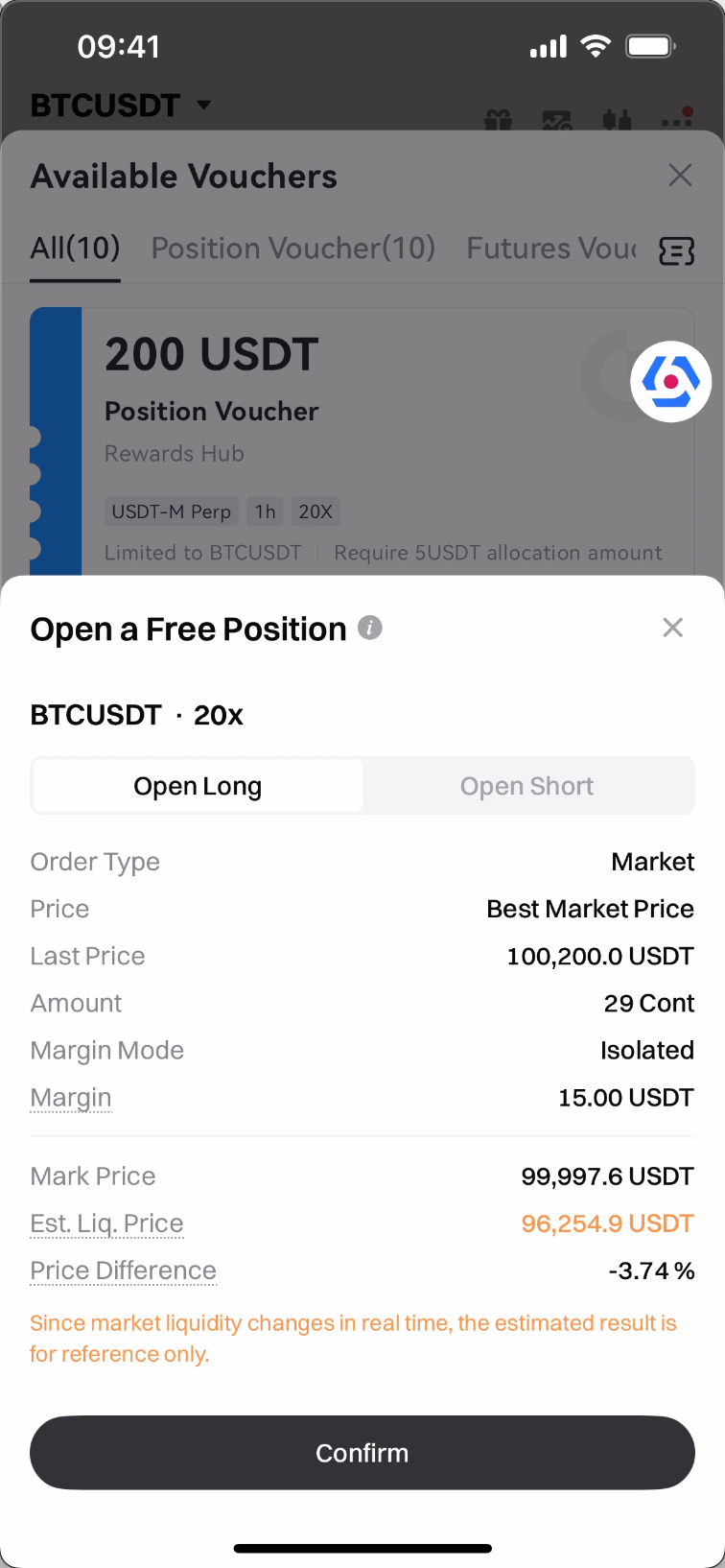
Step 2: Before you can proceed, the following prerequisites must be met (displayed directly in the pop-up):
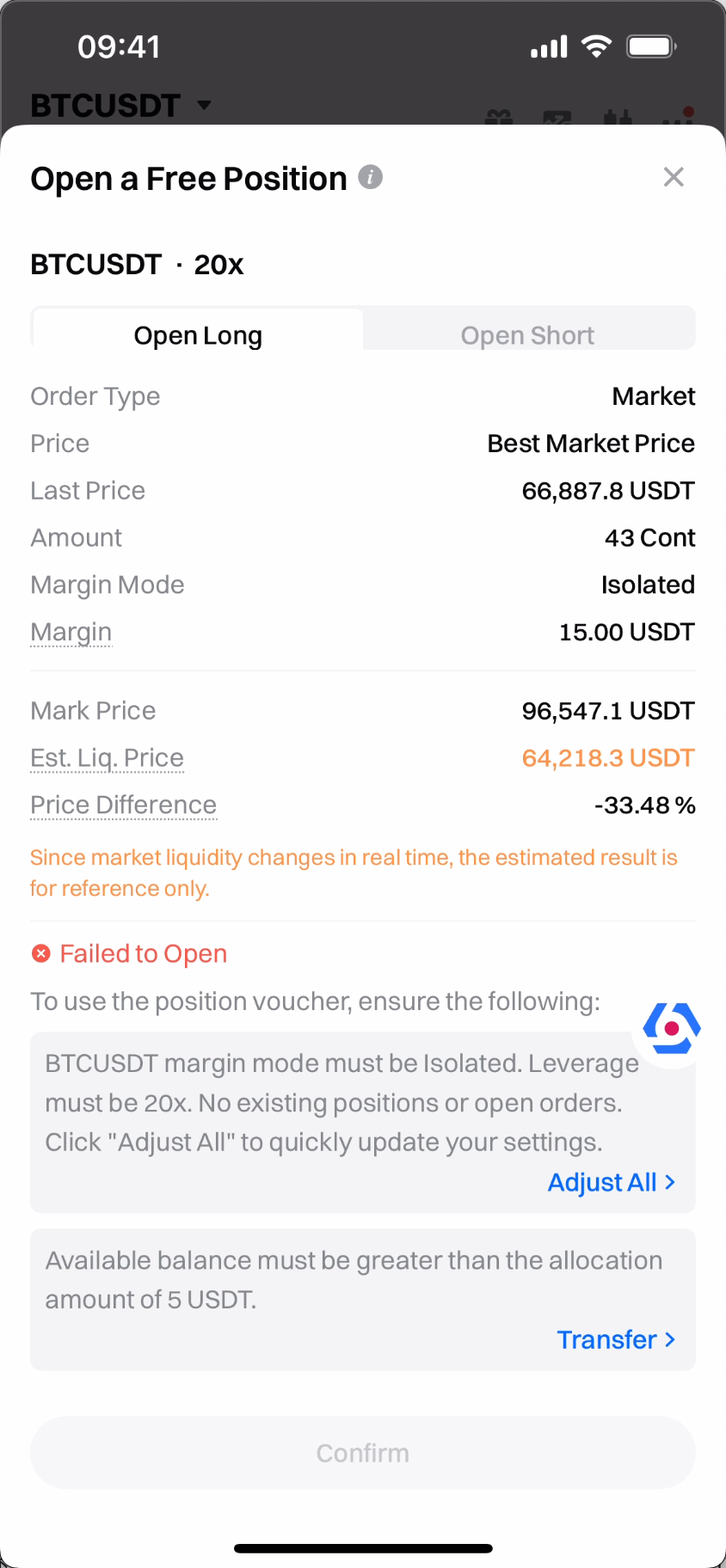
- For USDT-M contracts, your account margin mode must be isolated, and the leverage must match the one specified by the voucher. There must be no open positions or orders in the same market.
- For allocated vouchers, your available balance must exceed the required allocation amount set by the voucher.
Step 3: Since futures trading has various restrictions, we provide a one-click setup to help you meet the requirements. Tap [Adjust All] to view your current status and apply automatic adjustments, including closing positions at the market price and canceling open orders, and adjusting leverage and margin mode to the voucher's required settings.
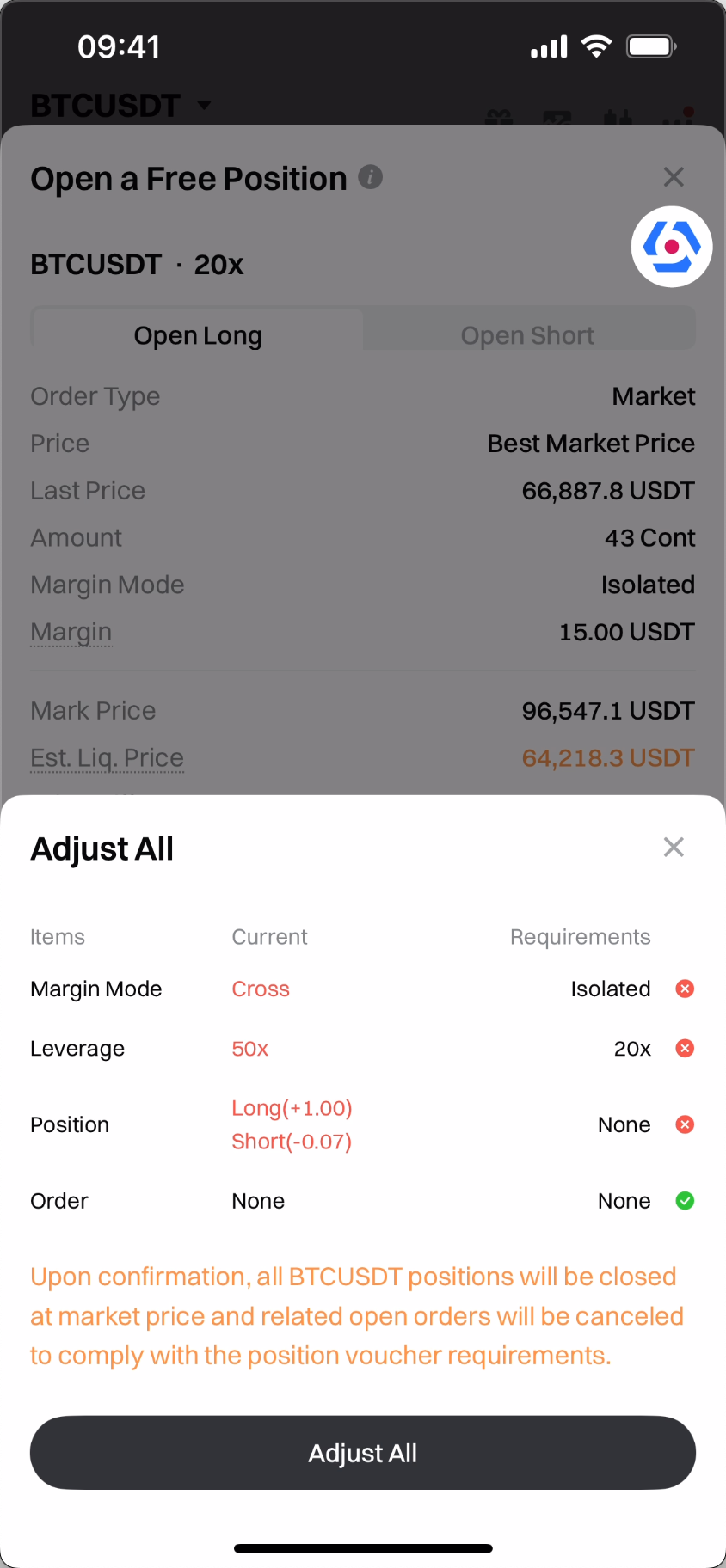
Note: In [Items] - [Positions], the unrealized PnL calculated using the last price is for reference only. Closing positions at the market price may involve slippage.
Step 4: Once all requirements are met, the confirmation button becomes active. Select your side and proceed to open the position.
Step 5: After successfully using the position voucher, a free position will be created. You can identify it with the Free Position tag and the countdown in the position.
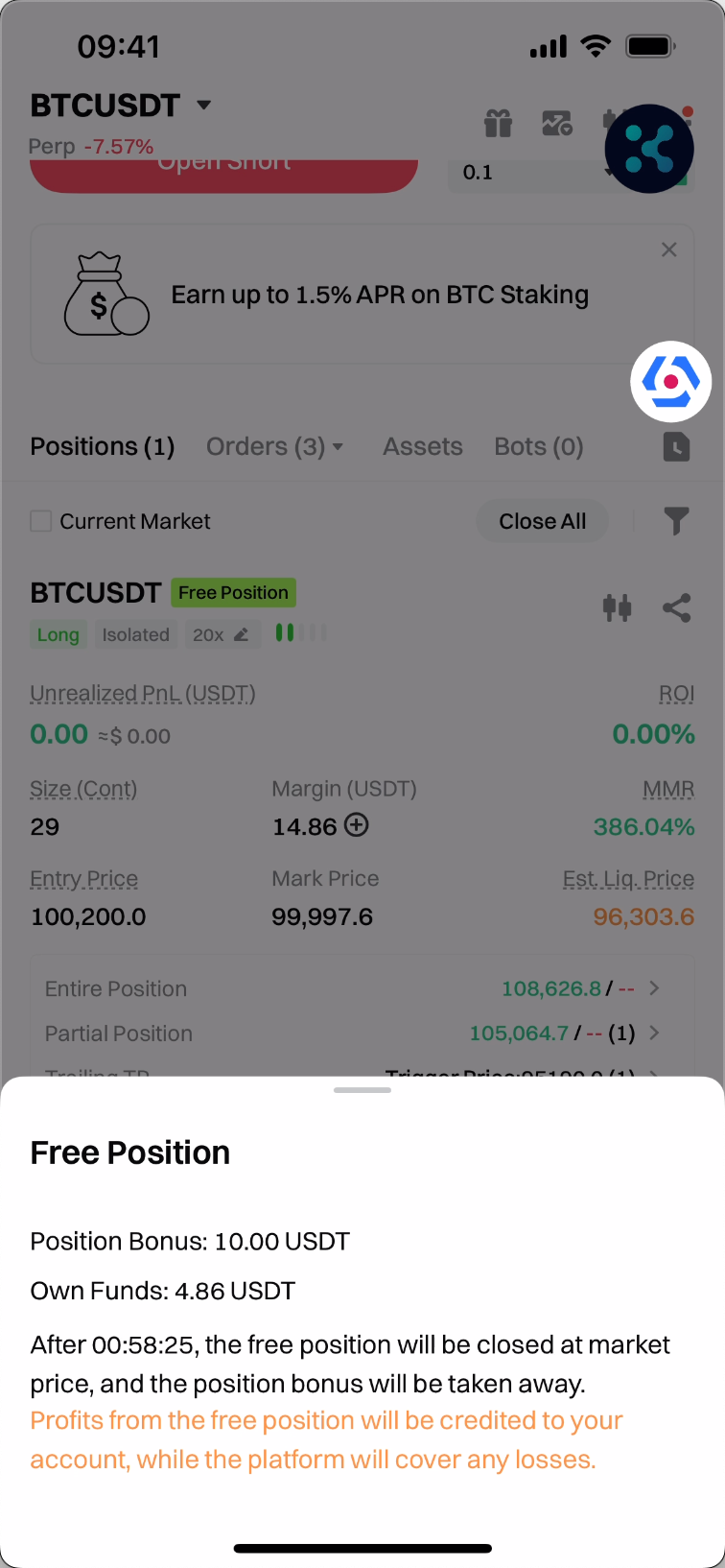
Step 6: Free positions support the same operations as regular positions. You can reduce, close, or reverse the position, and set take-profit/stop-loss (TP/SL) conditions for the position.
Rules and Deductions
-
Position vouchers are only supported in Classic Account Mode and Unified Account – Single Currency Margin Mode. Other modes are not supported currently. Please switch to the supported mode before using the position voucher.
-
Position vouchers are not available for lead traders.
-
Position vouchers and futures bonuses cannot be used simultaneously. If your account holds a futures bonus, position vouchers cannot be used.
-
Two types of position vouchers:
-
Standard Position Voucher: The platform provides the full position bonus used as margin. This bonus can offset trading fees, funding fees, and closing losses. (If there is any Points balance in your Futures Account, it will be automatically used to pay trading fees.)
-
Allocation Mode: You need to contribute a portion of your own funds, which will be combined with the platform's position bonus to open a position and form a free position. Trading fees and funding fees will be deducted from your own funds first. If the position is closed at a loss, the bonus will cover its share of the loss based on its proportion within the position (rounded down).
-
Due to market fluctuations, the free position may fail to open. Please follow the system prompts and try again later.
-
Free Position Value = Margin × Leverage = (Position Bonus + User Funds) × Specified Leverage. Some bonuses may not be fully used due to market fluctuations, but all remaining bonuses (excluding fees) will be used as margin, improving the margin ratio and risk resistance.
-
Position vouchers can only be used to open positions in the designated contract markets, using isolated margin mode and the leverage specified by the voucher. There must be no existing positions or open orders in the selected market.
Notes
Important notes on using position vouchers
- Trading Restrictions: Position vouchers may come with certain trading limitations, such as fixed leverage or being required to use market orders. During trade, free positions also have restrictions. For example, you cannot change leverage, increase the position size, or reuse the position bonus after closing.
- Market Volatility: Stay alert to market fluctuations and adjust your trading strategy for the free position accordingly.
- Closing and Deductions: When closing a free position, any loss will first be deducted from the position bonus. Your profit is calculated as the net gain after deducting exit fees, and it will be automatically credited to your account.
- Partial Closing: If a free position is partially closed, the corresponding portion of the position bonus will be taken away by the platform and cannot be reused.
- Expiration: Position vouchers have a limited validity period. Once used, the resulting free position will have a countdown. When the countdown ends, the platform will automatically close the position and take away the position bonus.
- Expiration: Position vouchers have a limited validity period. Once used, the resulting free position will have a countdown. When the countdown ends, the platform will automatically close the position and take away the position bonus.
- Please note that position vouchers can only be used in Live Trading and are not supported in Voucher Mode.
FAQ
Can I transfer a position voucher to someone else?
No. Position vouchers are exclusive to the account they were issued to and cannot be transferred.
How can I get more position vouchers?
You can obtain more position vouchers by participating in platform events, inviting friends to register, or completing specific tasks.
Can the position bonus be reused?
No. The position bonus can only be used as a margin for the corresponding free position. Once the position is partially or fully closed, or reversed, the bonus will be taken away and cannot be used again.
What happens if I lose money using a position voucher?
If the position is closed with a loss, both the bonus funds and your own funds will bear the close-out loss proportionally based on the position size.
How is profit from a position voucher settled?
Profit = PnL of Reducing Position – Exit Fee. The profit will be automatically deposited to your Futures Account or Unified Account, and can be withdrawn or used for trading.
Why is the actual position value less than 100 USDT for a 100 USDT position voucher?
-
If your 100 USDT position voucher is based on 10 USDT in position bonus and 10x leverage, the actual opened position value may differ due to:
-
The entry fee is deducted from the position bonus, reducing the available margin.
-
Market fluctuations cause part of the position bonus to be too small to meet the minimum order size (similar to "dust" balance).
- For example, if the current price of BTC is 100,000 USDT and the minimum order size is 0.0001 BTC (worth 10 USDT).
- A margin of 0.1 USDT × 10x leverage = 1 USDT is not enough to open a trade.
-
-
In such cases, Gate will not take away the unused portion of the position bonus. Instead, all remaining funds—excluding the entry fee—will be used as margin for the free position. This results in a lower-risk position with a higher maintenance margin ratio (MMR) and greater resistance to market volatility.
Why was my free position closed automatically?
- Free positions are time-limited. You can see the countdown after opening the position. When the countdown ends, the platform will automatically close the position and take away the position bonus.
- A Direct Message will be sent one hour before expiry, so please check your messages and take action if needed.
We hope this comprehensive guide helps you understand how to use Gate position vouchers effectively.
With position vouchers, you can experience futures trading risk-free, familiarize yourself with the platform, and even earn real profits. Claim your position voucher now and start your futures trading journey!
Gate reserves the final right to interpret the product.
For further assistance, please visit the Gate official support page or contact our customer support team.
Disclaimer
The content provided herein is for reference and educational purposes only and does not constitute any financial, investment, trading, or legal advice, nor does it constitute an offer or solicitation to buy or sell any digital assets. Gate makes no express or implied representations or warranties regarding the accuracy, completeness, or timeliness of the information contained herein. Product features, interfaces, rules, and fee structures may be updated or adjusted at any time. Please refer to the latest announcements and the actual information displayed on the Gate platform for the most accurate details.Digital asset investments involve significant risk, and prices may fluctuate substantially. You may lose the entire amount of your investment. Please make decisions cautiously based on your own financial situation and risk tolerance after fully understanding the associated risks. If necessary, you are advised to consult an independent professional financial or legal advisor.
For more information about potential risks, please refer to Gate's Risk Disclosure and User Agreement.
