


[Streamer Guide] How to Share Trading Strategies?
-
After starting a live stream, the streamer enters their live room via app and clicks [Strategy] - [Settings];
-
The streamer selects the types of orders to share and confirms;
-
Once confirmed, users can view the streamer's order details in the list (streamers are advised to use the pin feature to help users trade efficiently);
-
When users click [Copy Strategy], they will be redirected to the corresponding trading page, and the streamer’s order parameters will be automatically copied.
[User Guide] How to Copy Streamer's Trading Strategy?
-
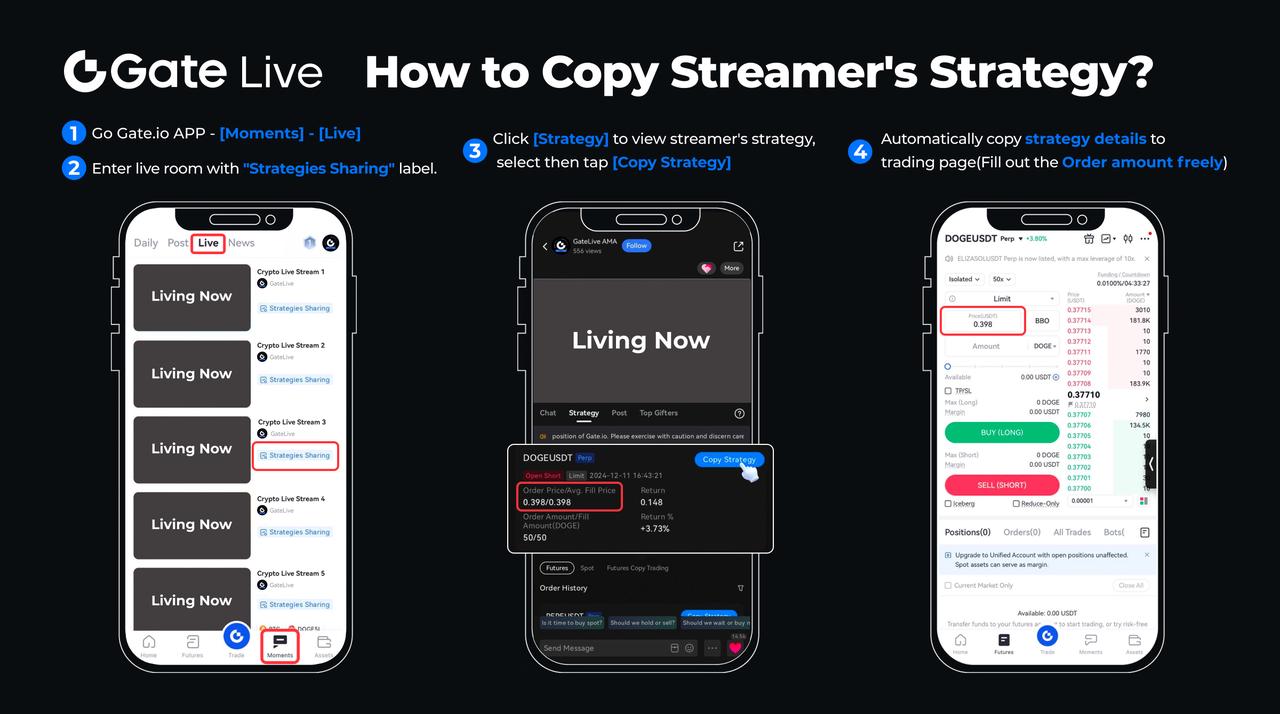
Open Gate APP and navigate to [Moments] - [Live];
-
Enter any live stream with the "Strategies Sharing" label;
-
Click the [Strategy] in the live room to view the streamer's shared trading strategies. Select a suitable strategy then click [Copy Strategy].
-
You will be redirected to the corresponding trading page, and the streamer's order parameters will be automatically copied (you can freely adjust the order amount).
Gateway to Crypto
Trade over 1,700 cryptocurrencies safely, quickly, and easily on Gate
GateLive: A Real-Time Gateway to the Blockchain World
Your Crypto Live Connection to Fortune
Download Gate App / Web Client now>>>
Follow us on Gate X (Twitter) to get more bonuses>>>
Join our Telegram to discuss hot topics>>>
Join our Global Community to get more updates>>>
We provide 100% proof of reserve>>>
Sign up to enjoy max. $6666 in rewards exclusively for new users
Get 40% commission from referrals
Gate Team
Jun 27th, 2024
Disclaimer
The content provided herein is for reference and educational purposes only and does not constitute any financial, investment, trading, or legal advice, nor does it constitute an offer or solicitation to buy or sell any digital assets. Gate makes no express or implied representations or warranties regarding the accuracy, completeness, or timeliness of the information contained herein. Product features, interfaces, rules, and fee structures may be updated or adjusted at any time. Please refer to the latest announcements and the actual information displayed on the Gate platform for the most accurate details.
Digital asset investments involve significant risk, and prices may fluctuate substantially. You may lose the entire amount of your investment. Please make decisions cautiously based on your own financial situation and risk tolerance after fully understanding the associated risks. If necessary, you are advised to consult an independent professional financial or legal advisor.
For more information about potential risks, please refer to Gate's Risk Disclosure and User Agreement.
